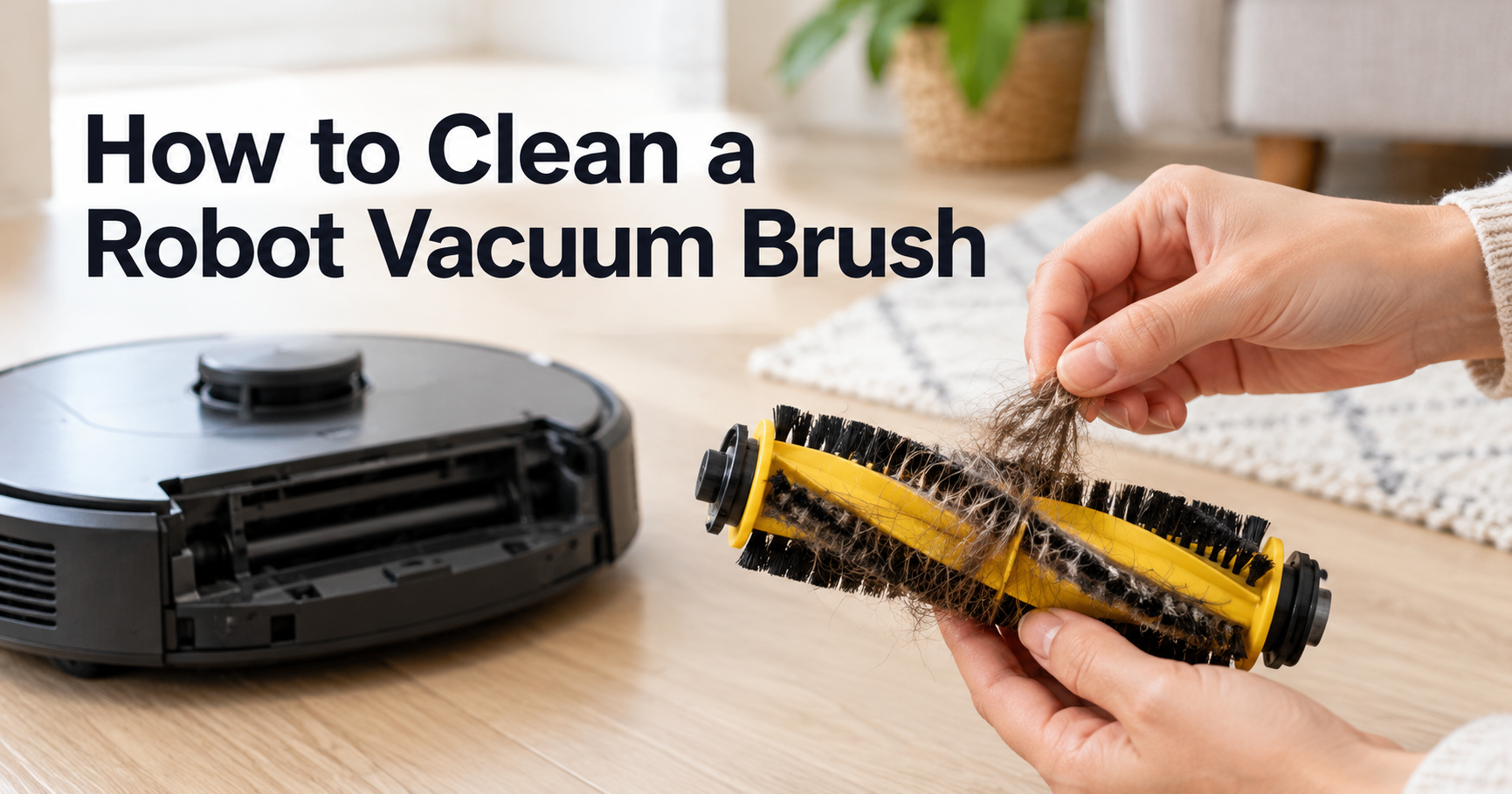




Your Roomba works hard every time it runs, and the part that works hardest is the brush. Sooner or later, hair, string and fluff wrap around the rollers, the end caps clog, and your robot starts leaving crumbs behind, sounding louder, or stopping with a brush error. The fix is simple, and you do not need any special skills.
This guide shows you exactly how to clean a Roomba brush, step by step. You will also learn how often to do it, how the process differs between brush types, what mistakes to avoid, and when it is time to replace the brush instead of cleaning it.
Quick answer
Stop the Roomba and flip it over, press the release tab and lift the brush frame, take out the brushes, pull off the hair, remove the end caps and clear the hair hiding underneath, then reinstall everything so the peg shapes match. It takes around 5 to 10 minutes. iRobot recommends inspecting the rubber brushes at least once a week, and twice a week if you have pets.
Why You Should Clean Your Roomba Brush Regularly
The brushes are what lift dirt out of carpet fibers and pull debris off hard floors toward the suction channel. When they are clogged, the whole cleaning system suffers.
- Stronger pickup. Clean rubber fins or bristles stay in contact with the floor and agitate dirt properly.
- Less motor strain. A brush fighting through a thick wrap of hair has to work harder, which can drain the battery faster and wear parts sooner.
- Less noise. Hair packed under the end caps often causes squeaking and grinding.
- Fewer stuck-brush errors. Your Roomba may stop mid-run or report a problem when a brush cannot turn freely.
- Longer lifespan. Healthy brushes protect the bearings and the brush motor.
- Tidier floors. A clogged brush can drag dirt around instead of lifting it.
Signs Your Roomba Brush Is Dirty or Clogged
- Hair or thread is visible on the brushes or around the end caps.
- The brushes spin slowly or not at all.
- Your Roomba leaves lines of dust or crumbs behind.
- You hear grinding, squeaking or rattling during a run.
- The robot stops cleaning or reports an error related to the brushes.
- Pet hair keeps ending up on the floor, even after a cleaning run.
- The bin looks nearly empty even though the floors look dirty.
Know Your Roomba Brush Before You Clean It
Roomba models do not all use the same brush design. Many current models use a pair of rubber multi-surface brushes that sit side by side in a removable brush frame. Some older models use a bristle brush with a flexible beater, and a few budget models use a single brush. The steps in this guide follow the common dual rubber brush layout, and the idea is the same for other designs: remove the brush, clear hair from the roller and the ends, then reinstall it correctly.
The end caps and the drive end are the parts people forget. The caps hide a surprising amount of hair, and the square and star pegs at the other end of the brushes collect hair as well. Check both ends every time you clean.
| Roomba brush type | Where you find it | Cleaning notes |
|---|---|---|
| Dual multi-surface rubber brushes | Many newer models, including i, j and s series | Remove both brushes, clear the end caps and pegs, and match the shapes when reinstalling. |
| Single multi-surface brush | Many entry-level and older models | Use the included cleaning tool, then twist off the end cap to remove trapped hair. |
| Bristle and beater brushes | Some older models | Cut hair along the roller, comb the bristles, and clear the ends. |
| Edge-sweeping (side) brush | Most models | Pull hair from the base and check the bristles for bends. |
Because the details differ between models, always check your user manual for the exact release method and brush layout.
What You Need to Clean a Roomba Brush
- The cleaning tool included with your Roomba. Many models ship with a small comb-style tool made for removing hair from the brush.
- Scissors. They help with stubborn hair that will not pull off.
- Tweezers. Handy for hair deep under the end caps.
- A soft cloth. Use it to wipe the brushes, the cleaning head and the debris path.
- A soft towel. Place it under the robot to protect the shell and wheels.
- A small container or bag. This keeps small parts like end caps from rolling away.
How to Clean a Roomba Brush: Step by Step
Step 1: Stop Your Roomba and Flip It Over
Make sure your Roomba is not running and take it off the Home Base if it is docked. Place a soft towel on a flat surface and turn the robot upside down so the brush frame faces up.
Step 2: Open the Brush Frame
Find the brush frame release tab on the underside of the cleaning head. On many models, you press the tab to lift the latch and then lift the brush frame out. Some models use two tabs, so look closely before you pull.
Step 3: Remove the Brushes
Lift the brushes out of the robot. Notice which brush goes where, since many Roombas use brushes with different peg shapes so they can only fit one way. Set them down in the same orientation they came out.
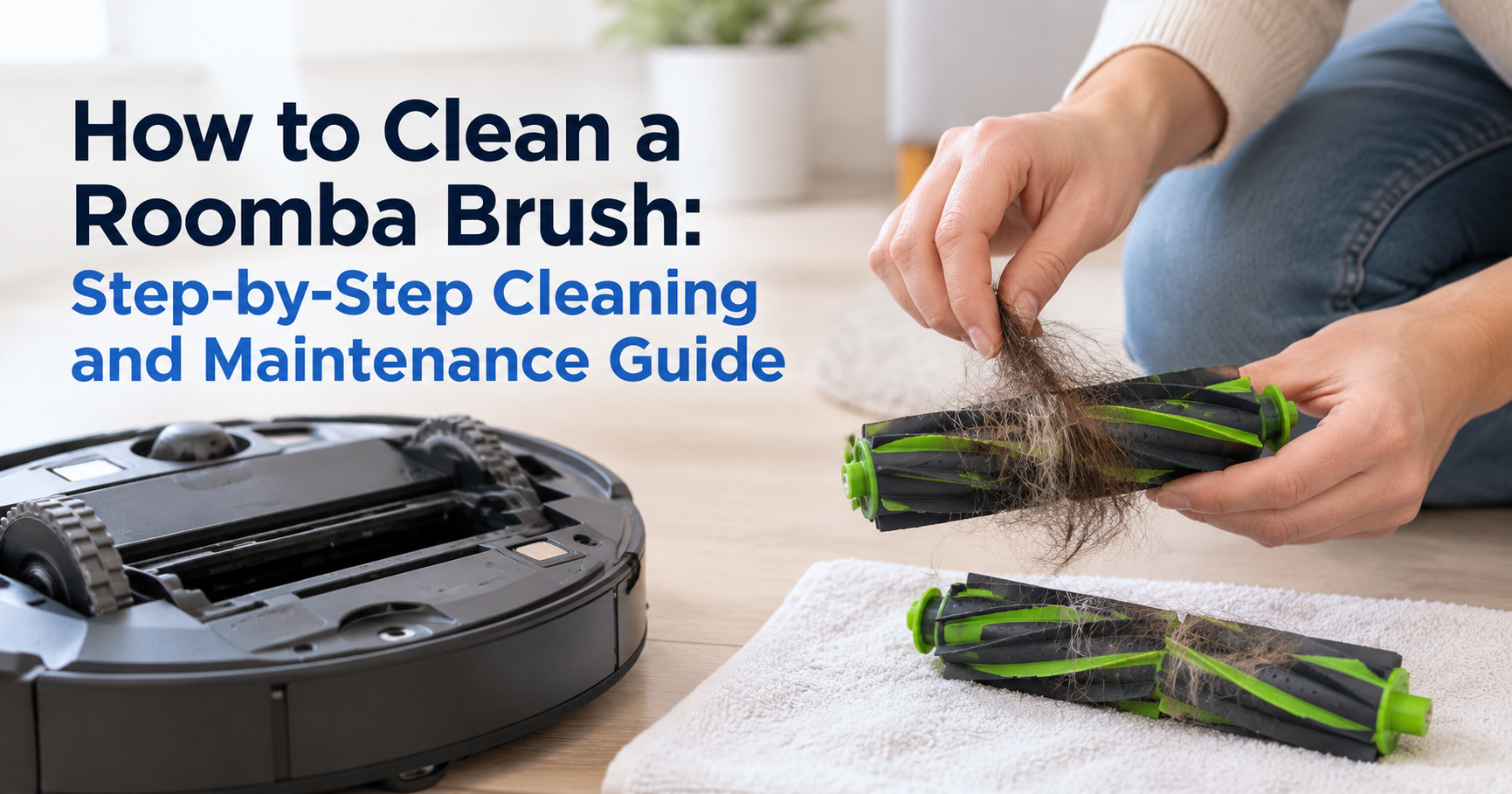
Step 4: Remove the Hair and Clear the End Caps
Pull the hair and debris off each brush with your fingers or the cleaning tool. Cut stubborn strands with scissors, taking care not to nick the rubber. Then remove the end caps. Depending on the model, they may twist off or pull off. Clear any hair and debris that collected beneath them, then put the caps back on correctly.
Safety note: End caps are small parts and can be a choking hazard. Keep them away from children and pets while you clean, and make sure they are fitted back on the right way round.
Step 5: Clean the Pegs, Bin and Debris Path
Look at the other end of each brush, where the square and star pegs are, and remove any hair wrapped around them. Next, take out the bin and clear debris from the vacuum path, the opening that carries dirt from the brushes to the bin. A clean brush cannot work properly if the path behind it is blocked.
Pro tip: Cut hair in a few short sections instead of unwinding one long strand. Short pieces come off the roller much faster and are less likely to snag the fins.
Step 6: Reinstall the Brushes and Run a Test
Match the shape of each brush peg with the shape icon in the cleaning head, then press the brushes into place. Put the brush frame back and close the latch until it clicks. Flip the robot upright and run a short cycle. The brushes should spin freely and quietly.
How to Clean the Roomba Edge-Sweeping Brush
The small spinning arm on the side is called the edge-sweeping brush, and it tangles just as easily. On many models, you can pull it off by hand or remove it with a small screwdriver. Unwind hair from the base, check that the bristles are not bent or flattened, and reattach it firmly. If the bristles stay bent after cleaning, the brush is worn and should be replaced.
Do Not Forget the Rest of Your Roomba
While you have the robot upside down, take a minute for these quick checks:
- Filter: tap it gently over a bin to knock out dust, and replace it when it looks worn or when your manual says so.
- Wheels: remove hair wrapped around the wheel axles.
- Cliff sensors and charging contacts: wipe them with a dry, soft cloth.
- Front caster wheel: pull out hair that blocks it from turning.
How Often Should You Clean a Roomba Brush?
As a rule, check the main brushes once a week. If you have pets or long hair at home, check them twice a week. If your Roomba runs every day, expect hair to build up faster.
These are general guidelines. Your user manual may recommend slightly different intervals for filters and other parts.
Common Roomba Brush Cleaning Mistakes
- Skipping the end caps. This is where a lot of hidden hair sits, and it is a top cause of noise and drag.
- Mixing up the brushes. Always match the peg shapes to the icons in the cleaning head.
- Soaking the brushes or the robot. Do not submerge the robot, and follow your manual before using any water on a brush.
- Reinstalling the caps incorrectly. A cap that is not fully seated can come loose or rub the brush.
- Using sharp blades carelessly. A slip can damage the rubber fins.
- Ignoring the vacuum path. A blocked path hurts suction even when the brushes are clean.
- Waiting for a failure. Quick weekly cleaning is far easier than removing a dense mat of hair.
How to Prevent Hair from Wrapping Around Your Roomba Brush
- Pick up cords, socks, hair ties, ribbons and loose threads before every run.
- Use no-go zones or virtual barriers near fringe rugs and tassels.
- Groom pets regularly to cut down on loose fur.
- Run your Roomba more often so it collects hair before it piles up.
- Trim long rug fringes.
- Choose rubber multi-surface brushes over bristle brushes if you have long hair or pets, since rubber brushes tend to tangle less.
When to Replace Your Roomba Brush
Even with good care, brushes wear out. iRobot recommends replacing the main brush every 6 to 12 months for the best cleaning performance. Replace it sooner if you notice any of these signs:
- The rubber fins are torn, cracked or flattened.
- Bristles are bent, missing or worn down.
- The brush still does not spin freely after cleaning.
- Noise continues even when the end caps are clear.
- Your cleaning results are clearly worse than before.
Always choose a brush made for your exact Roomba model. Brush shapes, peg patterns and lengths vary between series, so check the model number on the underside of your robot before you buy.
Troubleshooting: Roomba Brush Problems After Cleaning
| Problem | Likely cause | What to try |
|---|---|---|
| Brush does not spin | Brush not seated properly, or hair still under a cap | Reopen the frame, check both ends of each brush and reinstall. |
| Loud or squeaky brush | Hair around the end caps or pegs | Remove the caps and pull out hidden hair with tweezers. |
| Brushes keep tangling | Long hair, fringe or cords on the floor | Clean more often and clear the floor before each run. |
| Roomba stops with a brush error | Debris jammed in the brush area | Flip the robot and clear the brushes, frame and debris path. |
| Poor pickup after cleaning | Worn brushes or a full bin and clogged filter | Empty the bin, check the filter and replace worn brushes. |
Useful Roomba Maintenance Accessories
- Replacement brush set: keep a spare so you can swap it right away when the old one wears out.
- Replacement edge-sweeping brushes: these wear out quickly, so multipacks are practical.
- Replacement filters: fresh filters keep suction strong.
- Cleaning tool or mini comb: makes hair removal faster and safer for the rubber.
- Handheld mini vacuum: good for the brush bay and the bin.
Before you buy any part, confirm that it fits your exact model.
Frequently Asked Questions
How often should I clean my Roomba brush?
Check the brushes at least once a week, and twice a week if you have pets or long hair. Clean the end caps every time.
Can I wash a Roomba brush?
Check your manual first, because the answer depends on the model and the brush type. In general, avoid soaking the brushes or any part with electronics, and never submerge the robot. For most routine cleaning, removing the hair and wiping with a soft cloth is enough.
Why does my Roomba brush keep getting tangled?
Long hair, pet fur, rug fringe, string and cords are the usual causes. Bristle brushes tangle faster than rubber ones. Cleaning more often and picking up loose items before a run will reduce the problem.
How do I remove hair stuck under the end caps?
Take the brush out, remove the end cap, and pull the hair out with your fingers or tweezers. Reinstall the cap correctly. Keep the small caps away from children and pets.
Why is my Roomba brush not spinning?
Hair may be blocking the roller or the end caps, the brush may be in the wrong position, or the brush frame may not be closed. Reopen the frame, clear the hair, and reinstall the brushes by matching the peg shapes.
How often should I replace the Roomba brush?
iRobot recommends replacing the main brush every 6 to 12 months for the best cleaning performance. Replace it earlier if the fins or bristles are visibly worn.
Can I use scissors on the Roomba brush?
Yes, carefully. Use the included cleaning tool first, then scissors for stubborn hair, and cut only the hair, not the rubber fins or bristles.
How long does it take to clean a Roomba brush?
Plan on 5 to 10 minutes for a routine clean, and a little longer if the brushes are badly tangled.
Final Thoughts
Learning how to clean a Roomba brush is one of the easiest ways to keep your robot vacuum working like new. A few minutes each week clears hair, quiets the noise, protects the motor and keeps your floors cleaner. Open the frame, remove the brushes, clear the end caps and pegs, reinstall them correctly, and replace the brushes when they wear out.
Roomba is a registered trademark of iRobot Corporation. This guide is independent and is not affiliated with or endorsed by iRobot. Brush designs vary by model, so always follow the instructions in your user manual.