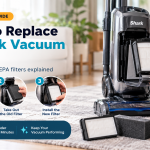




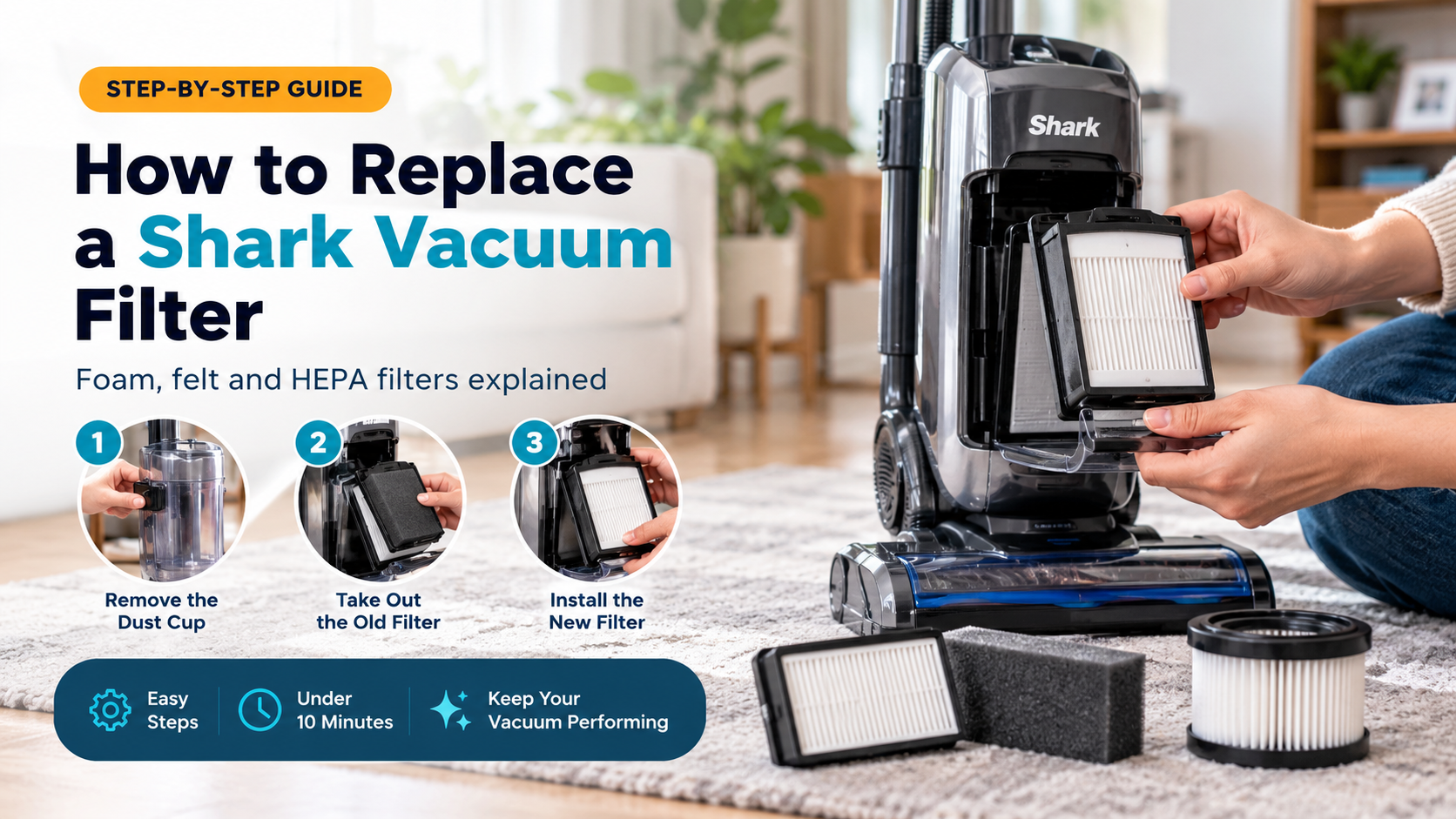

If your Shark vacuum has started to lose suction, smells musty, or leaves dust behind on the floor, a clogged filter is the most likely cause. The good news is that replacing a Shark vacuum filter is one of the easiest maintenance jobs you can do at home. It takes less than ten minutes, needs no tools, and can bring your machine back to near-new performance.
This complete guide explains how to replace a Shark vacuum filter safely and correctly. You will learn how to tell when a filter is worn out, where the different filters are located, how to remove and install them, and how often each type needs attention. You will also find troubleshooting advice, common mistakes to avoid, and tips for choosing the right replacement filter for your model.
Why Your Shark Vacuum Filter Matters
A vacuum cleaner works by pulling air through the machine. Dirt and debris are trapped in the dust cup, while the filters catch the fine particles that would otherwise pass straight through the motor and back into your room. When those filters are clean, air flows freely, suction stays strong, and the exhaust air is cleaner.
When filters clog, the opposite happens. Airflow drops, the motor works harder, and fine dust escapes back into the air. Over time, a neglected filter can lead to overheating, a shorter motor life, and a vacuum that seems to have stopped working properly even though nothing is actually broken. Replacing the filter on schedule is far cheaper than replacing the vacuum.
Signs It Is Time to Replace Your Shark Filter
Washing a filter helps for a while, but filters do not last forever. Look out for these warning signs:
- Weak or fading suction even after you empty the dust cup and check the brush roll and hose for blockages.
- A musty or stale smell coming from the exhaust, which usually means trapped dust and moisture inside the filter material.
- Visible discoloration or damage such as dark grey or brown staining that will not rinse out, crumbling foam, or tears in the felt.
- Fine dust blowing out of the vacuum while you clean, or a layer of dust settling on furniture soon after vacuuming.
- The vacuum running hotter or louder than usual, or shutting off by itself because the motor is overheating.
- A filter that stays damp or never feels fully clean after washing and drying.
If you notice more than one of these signs, replace the filter instead of washing it again.
Know Your Shark Filter Types
Shark makes many vacuum families, including upright, Navigator Lift-Away, Rocket, Vertex, Stratos, cordless stick, handheld and robot models. The filter setup changes from model to model, but most Shark vacuums use a combination of the following:
Pre-Motor Foam and Felt Filters
These are usually found underneath or behind the dust cup. They catch the larger fine particles before the air reaches the motor. They are typically a thick foam pad and a thinner felt pad, and they are the filters you will clean and replace most often.
Post-Motor HEPA Filter
Many Shark models include a HEPA-style filter located after the motor, often behind a cover on the side or rear of the vacuum. This filter traps very fine particles such as pollen, pet dander and dust mites before the air leaves the machine. It is especially important for allergy sufferers and pet owners.
Single or Combined Filters on Cordless and Handheld Models
Cordless sticks and handhelds often use a smaller filter inside or beneath the dust cup, and some have a separate exhaust filter. Robot vacuums usually have a filter built into or under the dust bin.

What You Will Need
You do not need special tools. Gather these items before you start:
- The correct replacement filter or filter kit for your exact model
- A soft brush or old clean paintbrush
- A clean, dry towel or cloth
- Cold running water (only if you are rinsing a washable filter)
- Your Shark owner’s manual, if you still have it

How to Find the Right Replacement Filter
Buying the wrong filter is the most common mistake, and it wastes both time and money. Shark filters are not universal. Even vacuums that look alike can use different shapes and sizes.
- Find your model number. It is printed on a data label, usually on the bottom, back or underneath the dust cup. It often begins with letters such as NV, UV, AZ, IZ, ZU or HV, followed by numbers.
- Match the filter to that exact number. Product listings normally state which models the filter fits. Check that your model is included before you order.
- Count how many filters you need. Many models use both a foam and a felt filter plus a separate HEPA filter. A kit may include some or all of them.
- Decide between genuine and compatible filters. Genuine manufacturer filters are designed for your machine and are the safest choice for performance and warranty. Compatible filters from third parties can cost less, but quality varies, so choose well-reviewed options with a clear fit guarantee.
Buying a multi-pack is often better value because you will need fresh filters again within a few months.
How to Replace a Shark Vacuum Filter: Step-by-Step
The steps below cover a typical upright or Lift-Away style Shark vacuum. Cordless and robot models follow the same basic idea, with small differences covered in the next section.
Step 1: Turn Off and Unplug the Vacuum
Switch the vacuum off and unplug it from the wall. For cordless models, turn off the power and remove the battery if your model allows it. Never handle filters while the machine is connected to power.
Step 2: Empty and Remove the Dust Cup
Press the dust cup release button or latch and lift the cup away from the body. Empty it into a bin. Doing this first stops dust spilling over you and the filter housing when you open the machine up.
Step 3: Locate the Pre-Motor Filters
With the dust cup removed, look for the foam and felt filters. On many models they sit in a recess directly beneath the cup, held in place by a plastic cover or simple friction. On others you may need to lift a small tab or twist a cover.
Step 4: Remove the Old Foam and Felt Filters
Pull the foam pad out gently, then lift out the felt pad beneath it. Take note of which way round each one sits and which one goes on top. Dust may fall as you do this, so hold the vacuum over a bin or a newspaper.
Step 5: Wipe the Filter Housing
Use a dry cloth or soft brush to remove loose dust from the empty housing. Do not use water inside the machine, and never let moisture reach the motor area.
Step 6: Install the New Filters
Place the new felt filter in first, then the foam filter on top, matching the orientation of the old ones. They should sit flat and snug with no folds or gaps. If you are reusing washed filters, make sure they are completely dry before installing them.
Step 7: Replace the HEPA Filter (If Your Model Has One)
Locate the HEPA filter cover on the side or rear of the vacuum, release the latch, and slide the old filter out. Insert the new filter in the same direction, then close the cover until it clicks. Many models recommend replacing the HEPA filter roughly once a year, though your manual will give the exact interval for your machine.
Step 8: Reattach the Dust Cup and Test
Slide the dust cup back until it locks into place, plug the vacuum in and switch it on. You should notice stronger suction and quieter airflow straight away. If the vacuum does not start, check that the dust cup is fully seated, as many Shark models will not run unless every part is correctly fitted.
Replacing Filters on Cordless, Handheld and Robot Shark Models
Cordless Stick Models
Remove the battery if possible, then detach the dust cup. The filter is usually inside the cup or at the top of the cup’s housing. Twist or pull it free, tap out loose dust, and fit the new one. Some cordless models also have a separate exhaust filter near the motor that should be replaced on a similar schedule.
Handheld Models
Open the dust cup and remove the filter, which is often a small foam or pleated insert. Replace it with the correct part and close the cup firmly.
Robot Vacuums
Remove the dust bin from the robot, open the lid, and take out the filter. Fit the new one, close the lid and slide the bin back in. Robot vacuums run frequently, so their filters usually need changing every few months. Check your model’s manual for the specific interval.
Cleaning vs Replacing: What Is the Difference?
Most Shark foam and felt filters are washable, but this only extends their life. It does not make them last forever. Here is the correct way to clean them between replacements:
- Tap the filter over a bin to remove loose dust.
- Rinse it under cold running water, squeezing gently until the water runs clear.
- Do not use soap, detergent or hot water, as they can damage the material.
- Squeeze out excess water without twisting or wringing the filter.
- Let it air dry completely for at least 24 hours in a well-ventilated spot away from direct heat.
Never put a damp filter back into the vacuum. Moisture can cause mold, bad smells and motor damage. Do not place filters in a dryer, microwave or oven, and do not use a hairdryer. If you cannot wait 24 hours, switch to a spare set of filters while the others dry. HEPA filters are different: some are washable and some are not, so check your manual before wetting one.
How Often Should You Replace a Shark Vacuum Filter?
The right schedule depends on how often you vacuum and what you vacuum up. As a general guide:
- Rinse washable foam and felt filters about once a month.
- Replace foam and felt filters every 3 to 6 months.
- Replace the HEPA filter about once a year.
Replace filters sooner if you have pets that shed heavily, live with allergy sufferers, vacuum a lot of fine dust such as plaster, sand or ash, or use the vacuum daily. Always follow the interval printed in your own manual if it differs from this guide.

Troubleshooting After Replacing the Filter
The Vacuum Still Has Weak Suction
The filter may not be the only problem. Empty the dust cup, check that the hose and wand are not blocked, clear hair from the brush roll, and make sure the dust cup seals tightly. Check that the filters are seated flat and that no cover is left open.
The Vacuum Will Not Turn On
Check that the dust cup, filter covers and HEPA door are all fully closed and latched. Confirm the vacuum is plugged in or the battery is charged. If it still does not start, a thermal protector may have tripped, so let the machine cool down for about an hour and try again.
There Is Still a Bad Smell
Empty and wash the dust cup, and wipe the inside with a damp cloth, then let it dry completely. Smells can also come from old hair and pet dander stuck in the brush roll or hose, so clean those areas as well.
The New Filter Does Not Fit
Compare the part with the old filter and check your model number again. Do not force a filter into place. If it does not slot in easily, it is probably the wrong part.
Common Mistakes to Avoid
- Putting a wet filter back in. This is the biggest cause of bad smells and motor trouble.
- Using the vacuum with no filter. This lets dust reach the motor and can quickly ruin it.
- Using soap or hot water. It breaks down the filter material and reduces its ability to trap dust.
- Ordering by appearance. Always match by model number, not by how a filter looks in a photo.
- Forgetting the HEPA filter. Many people only change the foam and felt filters and overlook the HEPA filter behind the cover.
- Ignoring the manual. Intervals and locations vary, so a quick look at your manual can save you from mistakes.
Tips to Make Your Shark Filters Last Longer
- Empty the dust cup after every use, or at least when it reaches the maximum fill line.
- Keep a spare set of foam and felt filters so you can swap them while the washed ones dry.
- Remove hair and thread from the brush roll regularly so the motor does not strain.
- Avoid vacuuming up wet messes, large debris or very fine powders such as flour and drywall dust unless your model is designed for them.
- Set a monthly reminder on your phone to check and rinse your filters.
- Store your vacuum in a dry place to stop moisture building up in the filter area.
Frequently Asked Questions
Can I wash a Shark vacuum filter?
Yes, most foam and felt filters are washable in cold water with no soap, and must be fully air-dried for at least 24 hours. Always check whether your HEPA filter is washable, because some are not.
How long does it take to replace a Shark vacuum filter?
Usually less than ten minutes. Washing and drying a reusable filter takes longer, mainly because of the 24-hour drying time.
Can I use my Shark vacuum without a filter?
No. Running the vacuum without its filters lets dust into the motor, which can cause permanent damage and poor air quality.
Do all Shark vacuums use the same filter?
No. Filters are designed for specific model families. Always check your model number before buying a replacement.
Are generic filters as good as genuine Shark filters?
Quality varies. Genuine filters guarantee the correct fit and filtration. Good compatible filters can work well, but low-quality ones may fit badly, filter less effectively and wear out sooner.
Why does my Shark vacuum smell after changing the filter?
The most likely causes are a damp filter, a dirty dust cup or a hair-clogged brush roll. Make sure everything is clean and completely dry.
How do I know which filter my Shark vacuum has?
Remove the dust cup and look beneath it for foam and felt pads, then check the side or rear of the vacuum for a HEPA filter cover. Your manual or model number will confirm the exact setup.
Final Thoughts
Knowing how to replace a Shark vacuum filter is a small skill that makes a big difference. A fresh filter restores suction, protects the motor, reduces odors and keeps the air in your home cleaner. Match the replacement to your exact model number, remove the old filters carefully, fit the new ones snugly, and keep up a simple schedule of monthly rinsing and regular replacement. With a few minutes of care, your Shark vacuum will keep cleaning like new for years.